Gambonanza v1.4.0 ships the most significant quality-of-life update the game has seen yet. If you are new to the game, here is the TL;DR for which settings to flip the moment you finish the tutorial: turn on Skip Boss Intros, turn on Skip Gachapon and Piece Wheel Animations, and flip the algebraic notation toggle on if you are learning chess notation or want a cleaner board view. Those three alone will save you dozens of hours of click-through across a full run.
All of these live inside the new Extra settings category (Main Menu -> Settings -> Extras), which v1.4.0 introduced specifically to group accessibility and convenience options in one place. Before this patch they were scattered or absent entirely.
Where to Find Everything: The New Extra Tab
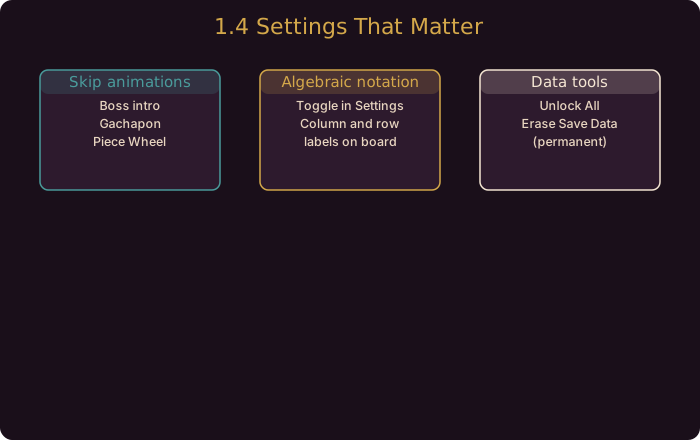
v1.4.0 introduced a dedicated Extra section inside Settings. Every new QoL feature in this article lives there. If you are coming from an earlier version, your Settings menu will look slightly different now. Look for the Extras tab on the left or bottom rail and click through. You will find the following grouped by function:
- Animation skips
- Unlock All
- Erase Save Data
- Algebraic notation toggle
- Visual effect toggles (Crumble start, last-piece highlight)
Take a minute to scan all of them. Some are one-time conveniences; others you will want on permanently.
The Big Time Savers: Animation Skips
This is the setting change that should have shipped years ago, and now that it is here, leaving it off is a choice you will regret every time you grind.
Skip Boss Introductions – Bosses in Gambonanza get a full cinematic entrance with dialogue and a board reveal. Charming the first time. Obstructive on run 40. Turn this on and the game drops you straight to the board. Boss mechanics and difficulty are unchanged; you just skip the theatrics.
Skip Gachapon and Piece Wheel Animations – This is the bigger win. The Gachapon spin and Piece Wheel resolve are surprisingly long animations, and across a full run you will see them dozens of times. Skipping them does exactly what it says: the game instantly lands on your result and moves on. The drop rates, rarity odds, and outcome randomness are unaffected. This is pure quality-of-life. No trade-off whatsoever.
There is no downside to skipping animations. Turn on both Boss Introductions and Gachapon/Piece Wheel skips immediately. This is the single highest-impact setting change in v1.4.0 and it takes three seconds to enable.
Chess Players, This One Is For You: Algebraic Notation Toggle
v1.4.0 added a toggle to display algebraic notation (the column letters a-h and row numbers 1-8) directly on the board tiles. If you are a chess player who already reads notation, this makes Gambonanza feel instantly more familiar. If you are learning chess, it gives you a visual anchor for thinking in rows and columns instead of relying on spatial memory alone.
The labels appear next to each tile, matching standard chess board orientation (white pieces start on rows 1, black on rows 8). Tile effects, piece colors, and Gambit overlays display as normal on top of the notation layer.
This is a purely visual toggle. No game logic changes. Flip it on and see if the cleaner spatial reference improves your board reading speed.
Unlock All: When to Use It
The Unlock All option unlocks every piece, board, cosmetic, and Gambit in one shot without requiring you to earn them through progression. This is designed for:
- Testing builds before committing to a run.
- Speedrunners who want to access specific Gambit combinations immediately.
- Content creators who need to demonstrate mechanics for guides or videos.
- Players on a second account who do not want to replay the unlock grind.
Using Unlock All does not break your existing saves or erase progression. It simply removes lock barriers. If you want a fresh start alongside it, the Erase Save Data option sits right next to it.
Erase Save Data: Use With Extreme Care
This one is self-explanatory but it warrants a direct warning. Erase Save Data wipes every run, achievement, unlock, and setting change you have ever made. The confirmation prompt is minimal. There is no undo. Do not touch this unless you are absolutely certain you want a completely clean slate.
The intended use case is players who want to replay the discovery experience from scratch or hand the game to someone else on the same machine. That is it.
There is no recovery after wiping save data. Back up your files or screenshots of your stats before using this. It is a one-way door.
New Visual Effects: Subtle But Useful
v1.4.0 added two new board visual cues that improve clarity without cluttering the interface.
Crumble Mode start effect – When Crumble Mode activates, the board now plays a distinct visual flourish to mark the moment. Previously, crumble tiles just started appearing without an obvious signal, which could catch new players off guard. Now the transition is unmistakable.
Last-piece remaining effect – When only a single piece remains on the board (whether yours or an enemy’s), the game highlights it with a distinct visual. This is especially useful in tense endgame scenarios where a lone piece swings the match. You no longer need to scan the whole board to confirm you are down to your last defender.
Both effects are on by default and do not currently have separate toggles in the Extras panel. If you find them distracting, the only option is to submit feedback to the devs requesting individual toggles.
Recommended Settings Loadout
For New Players
- Skip Boss Introductions: ON
- Skip Gachapon and Piece Wheel Animations: ON
- Algebraic Notation: ON (helps with board orientation)
- Unlock All: OFF (experience the unlock progression naturally)
- Erase Save Data: OFF
New players get the most value from the animation skips and notation toggle while building their intuition for the game.
For Veterans and Speedrunners
- Skip Boss Introductions: ON
- Skip Gachapon and Piece Wheel Animations: ON
- Algebraic Notation: OFF (board memory is already solid)
- Unlock All: ON (for build testing and run flexibility)
- Erase Save Data: OFF (unless you are restarting)
For Content Creators and Guides
- Skip Boss Introductions: ON
- Skip Gachapon and Piece Wheel Animations: ON
- Algebraic Notation: ON (matches standard chess framing for screenshots and video)
- Unlock All: ON (access any Gambit on demand)
- Erase Save Data: As needed
The Rest of v1.4.0 Worth Knowing
These QoL settings are the headline convenience features, but the patch delivered more. If you want the full picture of what v1.4.0 changed, see our Gambonanza 1.4.0 Patch Breakdown which covers Enhanced AI Mode, the Graveyard system, all balance changes, and Gambit revamps.
Quick highlights relevant to settings-conscious players:
- Enhanced AI Mode is also in the Extras tab. It makes enemies play conventional chess and disables achievements and extra rewards. Flip it only if you want a pure strategy experience.
- The Graveyard (buy back your last 5 lost pieces) is a new game system, not a setting. It appears automatically from PAWN difficulty onward.
- Promote into PAWN is now possible. Combined with Clown’s Gambit (which spawns a Phantom Tile when you promote into a PAWN), this unlocks a brand-new board engine for Phantom strategies.
Community Resources
Guide updated for Gambonanza v1.4.0 (released August 2026). All settings verified against the official Steam news posts 1.4.0, 1.4.0e, and 1.4.0f.