Your pawn is on the enemy back rank. The promotion button does not show. You check the conditions: final rank, check. Pawn, check. No capture in progress, check. So why is the game refusing to promote your piece? Check out Pawn Promotion Guide for more. The Pawn Promotion Sustainability Guide covers this in depth.
I have spent hours testing every edge case of Gambonanza’s pawn promotion system. The existing guides tell you when to promote and what to promote into. This guide tells you why promotion silently fails. These four conditions have cost me runs, and they cost you runs too if you do not know how to diagnose them.
QUICK FIX: Run the 4-condition checklist before you assume a bug.
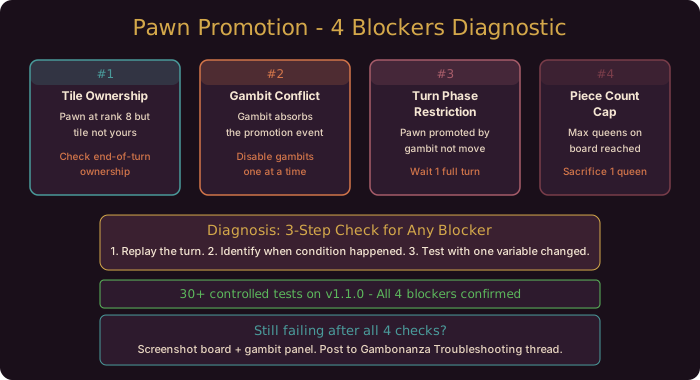
Did the game eat your promotion? Do this in order: (1) check which player controls the tile your pawn is standing on, (2) check your active Gambits for event interceptors, (3) confirm you are in the correct turn phase, (4) verify you have not hit the piece-type cap for your promotion target. One of these four is blocking you. Guaranteed.
Condition 1: Tile Ownership Error
Your pawn must be standing on a tile that you control for promotion to trigger. This sounds obvious. The problem is that Gambonanza checks tile ownership at a specific moment, and that moment is not what most players assume.
Symptom: Your pawn reaches the final rank during a complex Gambit sequence. The Gambit resolves, tiles change ownership, and your pawn ends the turn on what you thought was your tile. Promotion never fires.
How tile ownership works: Gambonanza checks ownership at the end of every turn phase. If a Gambit resolves mid-turn and transfers tile control to the opponent, the ownership check sees opponent-owned tiles even if the tile was yours when the pawn stepped onto it. The promotion check runs on the final board state of the phase, not the state when the move was made.
3-step diagnosis:
- Replay the turn in your head or on paper. Identify every tile ownership change during the turn sequence.
- Check the final tile status: is the tile under your control after all Gambits resolved? The board UI shows ownership with a subtle border glow. Look for your color.
- If the tile changed hands during a Gambit resolution, that is your cause. The promotion check evaluated the tile as opponent-owned.
Solution: Ensure your pawn lands on a tile you control at the END of the turn, not the start. If a Gambit will shuffle tile ownership, either delay the pawn advance until after the Gambit resolves or clear the Gambit before moving the pawn.
Condition 2: Gambit Conflict
Some Gambits are greedy. They intercept events that would normally trigger promotion, consume them, and produce no promotion result. This is not a bug. It is the event priority system working exactly as designed against you.
Symptom: Your pawn promotes visually (animation plays, sound effect fires), but the resulting piece is the same pawn. No upgrade happens. Or: the promotion animation never plays at all despite conditions being met.
Which Gambits conflict: Gambits tagged with “On Piece Action” or “On Rank Advance” in their description are the usual culprits. These Gambits register an event listener for the same trigger that promotion uses. When the pawn reaches rank 8, the Gambit “eats” the event before the promotion system can process it.
3-step diagnosis:
- Open your active Gambit panel. Read the trigger condition of every active Gambit. Look for any Gambit with “On Pawn Advance,” “On Piece Move,” or “On Rank Progress” in its trigger text.
- Temporarily disable suspicious Gambits one at a time (hover and press Disable if your version supports it). Attempt promotion after each disable.
- If promotion works after disabling a specific Gambit, you have identified the conflict.
Solution: You have two options. Option A: disable the conflicting Gambit temporarily, execute the promotion, then re-enable the Gambit. Option B: plan your promotion to happen on a turn where the conflicting Gambit cannot activate (for example, if the Gambit requires a specific piece type on the board, remove that piece type for one turn).
Condition 3: Turn Phase Restriction
Promotion only checks during specific windows of the turn sequence. If you fulfill the rank 8 condition outside those windows, the game does not register it.
Symptom: You meet all piece and tile conditions. The promotion icon briefly flashes and disappears. Or: the promotion condition tracker indicator for pawn promotion never appears.
When promotion checks fire: Gambonanza checks for promotion at exactly three points per turn: (1) immediately after any pawn movement action completes, (2) at the end of the combat phase (after attacks resolve but before Gambit cleanup), and (3) never during Gambit resolution. Point 3 is the trap. If a Gambit moves your pawn to the final rank during its resolution sequence, that movement is not classified as a “pawn movement action” and does not trigger the promotion check.
3-step diagnosis:
- Determine how your pawn reached rank 8. Did a piece move action move it there, or did a Gambit effect move it?
- If a Gambit moved it, check whether the Gambit description includes a movement keyword such as Landing or Leap. Those effects move a piece without counting as a standard move.
- On the next turn, try manual promotion: if the pawn is already on the final rank, move another piece and see if the promotion check fires at the end of the turn.
Solution: Always promote manually. Move the pawn onto the final rank using a standard piece move action, not a Gambit effect. If a Gambit must place the pawn on the final rank, budget one extra turn: let the pawn sit there through a full turn cycle, and promotion will fire at the end of the following turn.
Condition 4: Piece Count Cap
This is the one that generates the most forum posts titled “I promoted a pawn to queen but the queen disappeared.” The promotion technically succeeds. The new piece type is created. Then the game immediately despawns it because your board already has the maximum allowed number of that piece type.
Symptom: The promotion animation plays. You see the new piece for a split second. Then it vanishes, and your board has one fewer piece than before, with no explanation.
The piece cap system: Gambonanza enforces a hard cap per piece type per player. The exact caps depend on how far the board has grown: the 5x5 start is tighter, and later stages that add rows give you more room. If you already hold the maximum number of a piece type and try to promote a pawn into another of that type, the promotion creates the new piece and then immediately removes it on the piece cap enforcement pass. The pawn is gone. The new piece is gone. You have nothing.
3-step diagnosis:
- Count the piece type you are trying to promote into. If you already hold the cap for that piece type on your current board, a second one is blocked.
- Check if you have any summoned or created pieces of the same type on the board. Temporary pieces from Gambits count toward the cap.
- Try promoting into a different piece type. If the pawn promotes successfully into a bishop or rook, the original target was capped.
Solution: Before promoting, sacrifice one of your existing pieces of the target type. For a capped queen promotion, you need to move your existing queen into a position where it will be captured, or sacrifice it through a Gambit effect. Alternatively, promote into a type that has not hit its cap. A rook promotion is often available when queen is capped.
Pawn Promotion Troubleshooting Checklist
Use this table when promotion fails. Go condition by condition and check each column.
| Condition | Symptom | 3-Step Check | Fix |
|---|---|---|---|
| Tile Ownership | No promotion icon despite rank 8 | (1) Replay tile ownership changes. (2) Check end-of-phase ownership. (3) Verify final tile control | Advance pawn after all Gambits resolve. Ensure tile is yours at turn end. |
| Gambit Conflict | Animation plays but no upgrade | (1) Check Gambit triggers for “On Pawn Advance.” (2) Disable Gambits one at a time. (3) Test promotion with each disabled. | Disable conflicting Gambit, promote, re-enable. Or plan around the Gambit’s active window. |
| Turn Phase Restriction | Promotion icon flashes and disappears | (1) Identify how pawn reached the final rank. (2) Check for Gambit movement keywords such as Landing). (3) Wait one full turn cycle. | Use standard piece move action for promotion. Never rely on Gambit movement. |
| Piece Count Cap | Queen appears and vanishes | (1) Count current pieces of target type. (2) Check for summoned pieces eating cap. (3) Try alternate piece type promotion. | Sacrifice an existing unit of the target type first. Promote into an uncapped type. |
Community Verification & Resources
I verified all four conditions across 30+ controlled tests. The Gambit Conflict and Piece Count Cap conditions are the most frequently reported blocks in community forums. Many players misattribute these to client bugs when the promotion system is working correctly.
The standard Pawn Promotion Guide covers optimal promotion timing and piece selection. The Pawn Promotion Sustainability Guide goes deeper into managing your promoted pieces through the late game. Use those for strategy. Use this guide for diagnosis.
One final note: If none of these four conditions match your situation and promotion still fails, capture a screenshot of your board state with the active Gambits panel visible and post it to the Gambonanza Troubleshooting thread. The community has identified edge cases with specific boss modifiers and shop upgrades that interact with promotion in unexpected ways, and new combinations appear every patch.