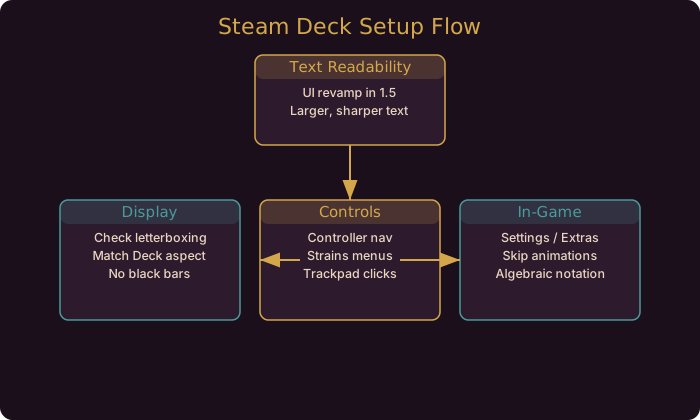
Why the Deck Needs Its Own Setup Guide
Gambonanza is a busy game. A small chess board, a dense Gambit sidebar, and a compact HUD are all fighting for space. On desktop you have monitor real estate to spare. On the Steam Deck you have a seven-inch screen and a controller. That is exactly why the 1.5.0 UI revamp targeted the Deck, and why Verified status matters: Valve’s criteria include legibility, default input, and stability on the handheld.
The good news is the game is light. This is not a shooter where you are chasing framerates. Your setup time is better spent on readability and controls than on performance.
Text and Readability
The 1.5.0 patch revamped the UI to make text easier to read, with the developer noting it mainly affects Steam Deck. Combined with the Verified status, that means the default experience is now good rather than merely playable.
What to check:
- Read the board at a glance. After the revamp, labels should be legible without zooming. If they are not, your device may be running a stale build. Update.
- Use the algebraic notation toggle if you read chess coordinates. It adds column and row labels next to tiles, which makes positions unambiguous on a small screen.
- Skip animations to cut Gachapon and Piece Wheel transitions, which shortens the time between decisions. On a handheld, fewer animations means less waiting.
Our UI and text readability guide goes deeper on what the revamp changed and how to use it.
Display and Letterboxing
Some Linux devices, including Steam Deck configurations, showed black bars at the top and bottom of the screen before 1.5.1. That letterboxing issue is fixed. If you still see bars after updating, check the game’s resolution settings and confirm the aspect ratio matches the Deck’s display.
A clean, full-screen board matters more here than on any other platform, because every pixel of the board is information.
Controls and Navigation
The 1.5.3 hotfix fixed navigation on Steam Deck and with a controller in the Strains menu. The Strains menu is where you review the difficulty modifiers attached to a run, so being able to move through it cleanly is not a minor detail.
Practical control notes:
- Strains menu: navigation now works as expected on Deck and controller. Review your modifiers before committing to a climb.
- Gambit collection tab: optimized in 1.5.3 for smoother navigation. Browsing all Gambits is now less of a chore.
- Hover info: 1.5.3 fixed the case where pressing Pause or Info while hovering a piece or Gambit showed the description behind the menu. It now appears in front, which matters when you tap a tooltip on a small screen.
- Trackpad: if you prefer trackpad-style pointing, the Deck’s trackpads work well for hovering tooltips. Many players find them more precise than the stick for reading Gambit text.
Full control details are in the controller and gamepad guide.
A Practical Deck Session
Here is a concrete sequence for a fresh install on the Deck:
- Launch the game and confirm it is on the latest 1.5.x build.
- Open Settings and check the display fills the screen with no letterboxing.
- Turn on skip animations and, if you read chess notation, algebraic notation.
- Start on PAWN so the Graveyard safety net is active while you learn the Deck’s input.
- Run one short game purely to test controls, not to win. Confirm the Strains menu and Gambit collection navigate cleanly.
- Only then start a serious climb.
Settings Checklist
| Setting | Recommended | Why |
|---|---|---|
| Game build | Latest 1.5.x | Text revamp and platform fixes |
| Display fit | Full screen, no bars | Letterboxing fixed in 1.5.1 |
| Skip animations | On | Shorter decision loops |
| Algebraic notation | On if you read it | Unambiguous positions |
| Strains navigation | Verify in menu | Fixed in 1.5.3 |
| Cursor visibility | Verify | Linux cursor fix in 1.5.2b |
What This Means for Your Builds
- Nothing about your strategy changes on Deck. The same Gambit math applies; only the presentation improves.
- Readability is now a platform strength, not a weakness. The revamp plus Verified status put Deck play on par with desktop for information access.
- Controls are reliable. With the Strains and collection fixes, you can manage modifiers and browse Gambits without friction.
- Update before judging. If your Deck copy feels rough, it is probably an older build.
Where To Go Next
If you want to go deeper on the systems referenced here, read the UI readability guide and controller guide. They cover the mechanics this patch touches in full detail.
Most of the toggles that matter here arrived as quality-of-life options in 1.4.0 rather than as Deck-specific settings, so the 1.4 quality-of-life settings guide is worth reading alongside this one.
Trackpad hovering is the fastest way to read a Gambit tooltip on the Deck. It is more precise than the stick and the 1.5.3 fix made the text land in front of the menu.
Community Resources
Guide updated for Gambonanza v1.5.x (released August to September 2026). Readability revamp, letterboxing fix, cursor fix, and navigation fixes verified against the official Steam news posts.