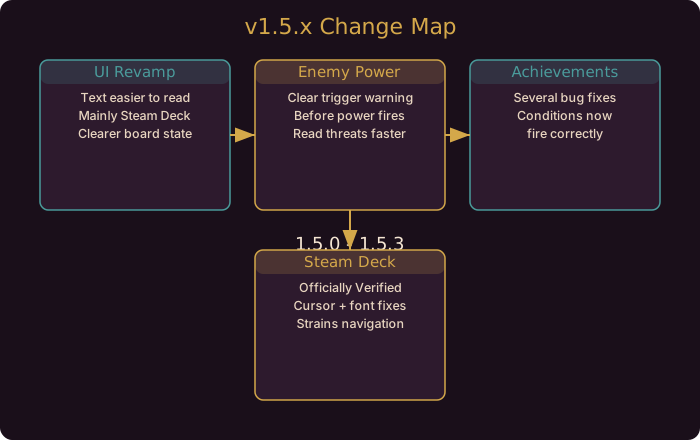
What Landed in 1.5.0
This is every material change pulled straight from the official 1.5.0 Steam news post, plus the hotfixes that followed it (1.5.1, 1.5.2b, 1.5.3). If you only read one section, read the verdict above: nothing here changes your Gambit math, so your existing tier lists and build notes are still valid.
UI Revamp for Readability
The single biggest change in 1.5.0 is a UI overhaul aimed at making text easier to read. The developer notes are explicit that this mainly affects Steam Deck, where the board and the information panels are compressed onto a small screen.
In practice this means piece labels, Gambit descriptions, and menu text are clearer than they were before. If you played earlier builds on a handheld and squinted at a crowded board, this patch is the fix. On desktop the change is subtler but still present, especially in the sidebar and the in-run HUD.
The two systems this helps most:
- Reading the board at a glance. Faster recognition of which piece is where means faster decisions.
- Reading Gambit text mid-run. Less time parsing a tooltip, more time playing.
Clearer Feedback When an Enemy Power Triggers
The second headline change is better feedback when an enemy power is about to fire. Before 1.5.0, it was easy to lose a piece to an enemy ability you did not see coming because the visual cue was too subtle. 1.5.0 adds a clearer prompt that makes the incoming trigger more obvious.
The practical consequence is that you now get a warning window. Treat it as a reaction cue:
- When the prompt appears, re-check which of your pieces is exposed.
- Decide immediately whether to shield, move, or accept the loss.
- Do not spend the window reading a tooltip. The cue is short.
Our enemy powers guide breaks down how to read these triggers and what to do in the warning window.
Achievement Bug Fixes
Several Steam Achievements were failing to fire correctly, and 1.5.0 fixes a batch of them. If you met an achievement condition and did not get credit, the fix means it should now register when the condition is met again. The developer did not enumerate every achievement touched, so the honest guidance is: replay the condition once and confirm.
Steam Deck Verified
Gambonanza is now officially Steam Deck Verified. That is a meaningful signal: the game has been checked against Valve’s compatibility criteria for input, legibility, and stability on the handheld. If you were holding off on buying for the Deck, the barrier is gone.
Change Summary
| Area | What Changed | Impact |
|---|---|---|
| UI and text | Revamp for readability (mainly Steam Deck) | Faster board reading |
| Enemy powers | Clearer feedback before a power triggers | Reactive warning window |
| Achievements | Several bug fixes | Conditions fire correctly |
| Platform | Officially Steam Deck Verified | Confident handheld play |
| Balance | No Gambit number changes | Builds carry over |
What This Means for Your Builds
- Nothing changed numerically. If you were mid-climb on a build, keep going. No Gambit probabilities, prices, or effects moved in 1.5.0.
- Handheld players get a real upgrade. The readability changes plus Verified status make the Deck a first-class way to play.
- Reactive play gets better. The enemy power warning turns some unavoidable losses into avoidable ones.
- Achievement hunters catch up. Re-run any condition that failed to register.
Where To Go Next
If you want to go deeper on the systems referenced here, read the Steam Deck settings guide and enemy powers guide. They cover the mechanics this patch touches in full detail.
The follow-up hotfixes matter too. The 1.5.1 to 1.5.3 hotfix breakdown lists what was fixed after this release landed.
The enemy power warning is a reaction cue, not a pause button. Decide your response before it appears, and you will save more pieces than any defensive Gambit.
Community Resources
Guide updated for Gambonanza v1.5.x (released August to September 2026). All changes verified against the official Steam news posts for 1.5.0, 1.5.1, 1.5.2b, and 1.5.3.